

November 12, 2026
How to Read Your Browser Activity Timeline and Spot Hidden Distractions
Learn how to read your browser activity timeline, understand focus and distraction patterns, and spot recurring interruptions without judging your productivity.
Most productivity dashboards tell you how much time you spent on different websites. A timeline helps you ask a more useful question: what happened right before your attention changed?
At the end of a workday, it's tempting to reduce everything to one number: hours focused, minutes distracted, or a percentage that says whether the day was “good.”
But those totals leave out the order of events. An occasional five-minute break is different from returning to the same unrelated website every time a difficult task begins. A day with frequent switching between documentation and an editor can be productive. A day spent almost entirely on work-related sites can still feel scattered.
That's why I've been paying closer attention to browser activity timelines. When I looked back at my browsing on November 8 and 9, I was less interested in scoring those days than in understanding the sequence of my actions.
Here is a simple way to read a timeline without turning it into another source of pressure.
1. Start with categories to see the shape of your day
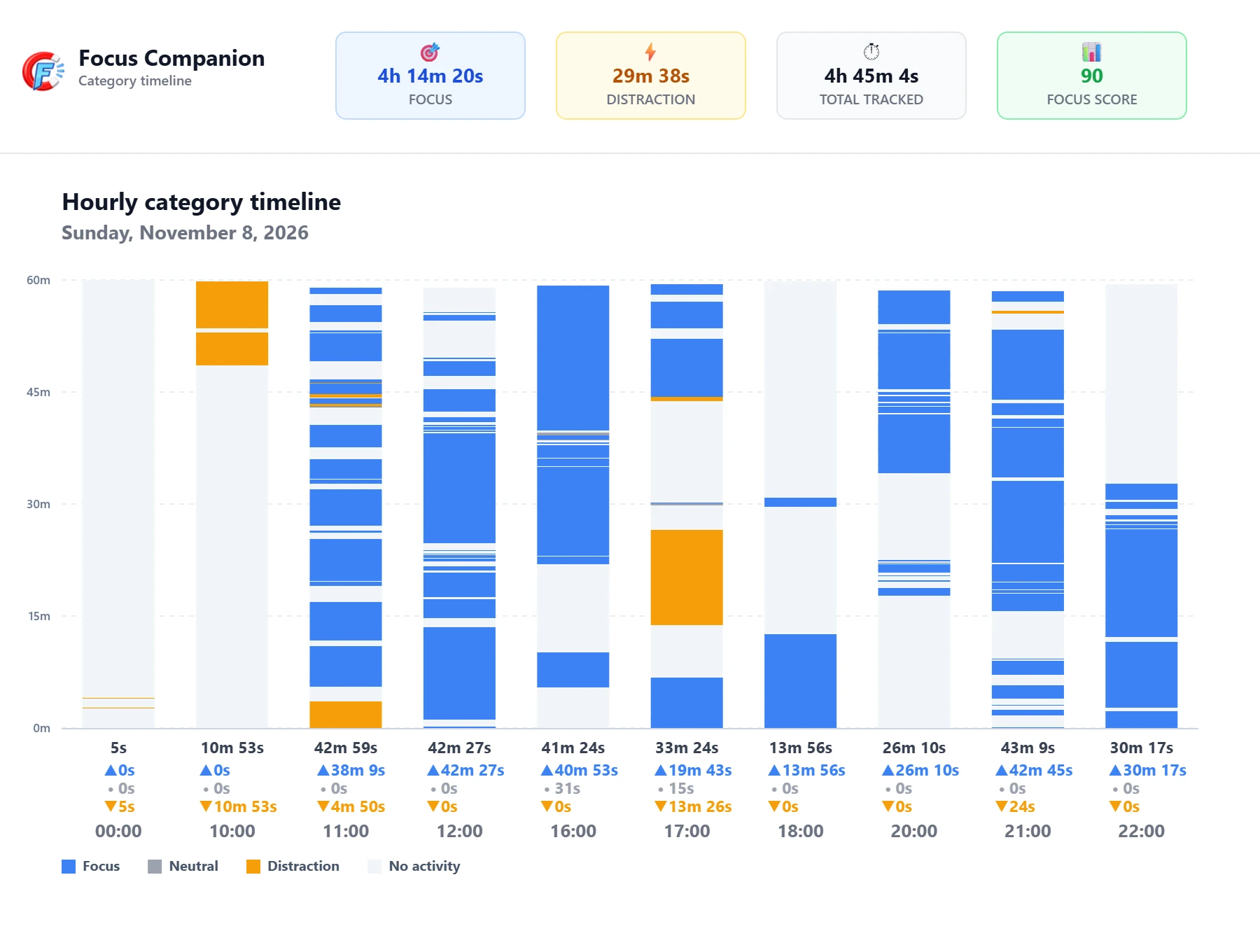
A category timeline gives you a broad view of when your browser activity was classified as Focus, Distraction, or Neutral. These labels are contextual; they reflect how you've categorized websites, not an objective verdict on every minute.
Instead of searching for a perfectly uninterrupted block, look for changes. Where does a period of focused activity begin? Where does a different category appear? Does the activity return to focus, or move somewhere else?
November 8 - the category view shows when the type of browsing activity changed, not whether every switch was a mistake.
The important question is not, “Why wasn't this entire day green?” It is, “What was I trying to do when the pattern changed?” A neutral activity may have been necessary. A distraction label may represent a deliberate break. The timeline gives you a place to investigate, not a reason to judge yourself.
2. Use the domain timeline to understand what changed
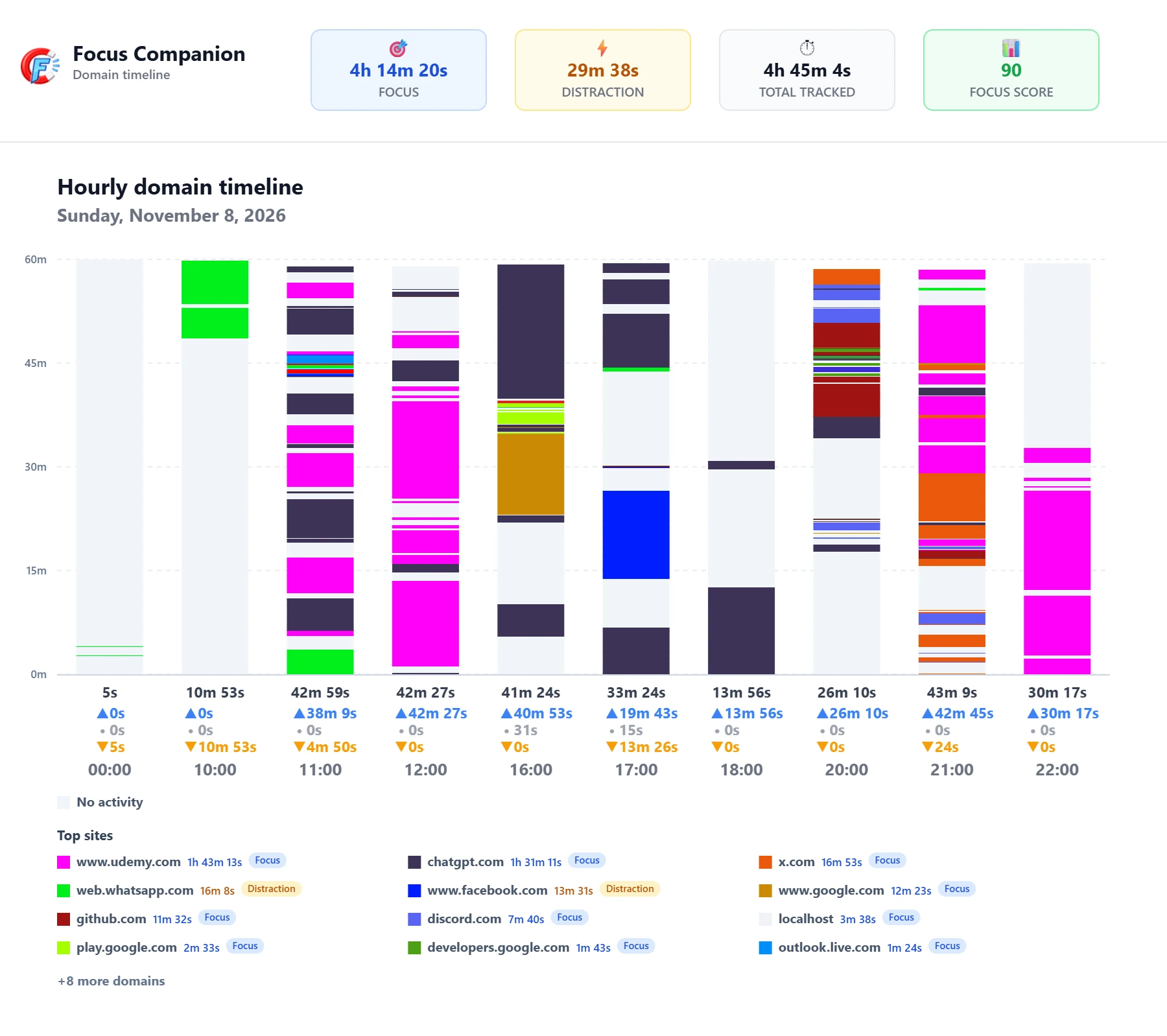
Once you spot an interesting transition, switch to the domain timeline. It adds a more specific view of the websites involved.
Imagine a sequence like this:
Writing tool → documentation → inbox → writing tool.
That could be a perfectly reasonable workflow. But if the inbox opens every time the writing gets difficult, the same sequence may reveal an avoidable interruption.
November 8 - the domain view adds context to transitions that category totals alone cannot explain.
This is why order matters as much as totals. A domain report can tell you where you spent time. A timeline can help you notice repeated detours and the websites you tend to return to. Neither can tell you why you switched without your own context.
When reviewing a section, ask yourself: Was the next website needed for the task? Was I waiting for something? Had I finished one task and started another? Or was I simply looking for an easier thing to do?
3. Compare two days instead of judging one
One day is a snapshot, not a personality test. Meetings, deadlines, research, fatigue, and the type of work on your calendar all affect how your browsing looks.
That is why I like comparing two days side by side. My November 8 and November 9 timelines gave me a starting point for a more useful question: which changes seem connected to the work itself, and which might be habits worth exploring?
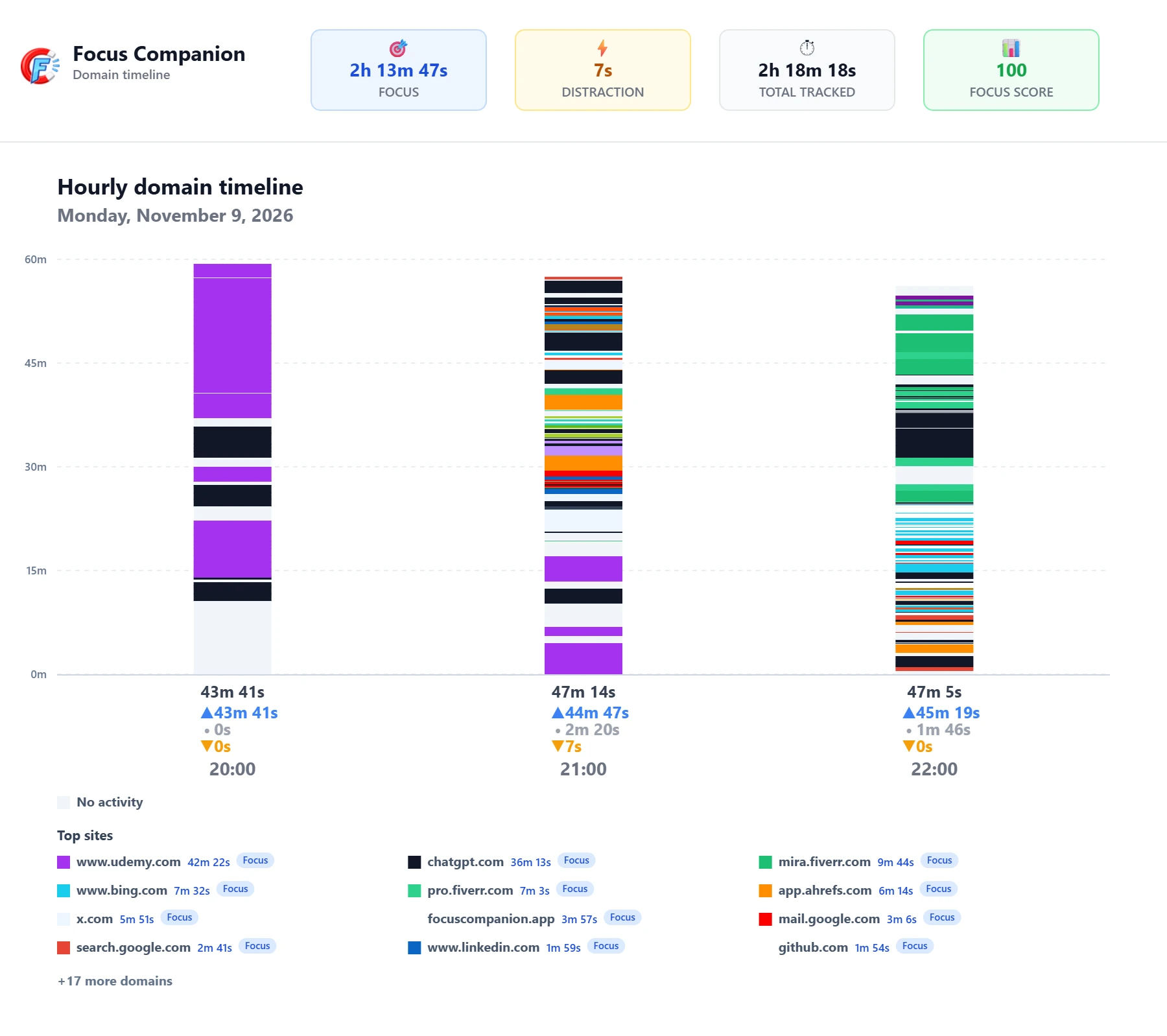
November 9 - comparing a second day helps distinguish a recurring pattern from a one-off interruption.
Look for broad similarities before interpreting differences. Perhaps both days contain a transition around a similar part of your routine. Perhaps one day is fragmented because you had many small tasks, while another contains longer stretches on one project. Neither is automatically better.
The goal is not to make November 9 look more like November 8. It is to understand what each day required from you.
4. Look for recurring loops, not just long visits
The most obvious distraction is a long visit to a site you didn't intend to open. But the more revealing pattern can be a short, repeated loop:
Current task → unrelated site → current task → unrelated site.
A few small interruptions can be easy to forget because none feels significant in isolation. In a domain timeline, a recurring transition may be easier to notice.
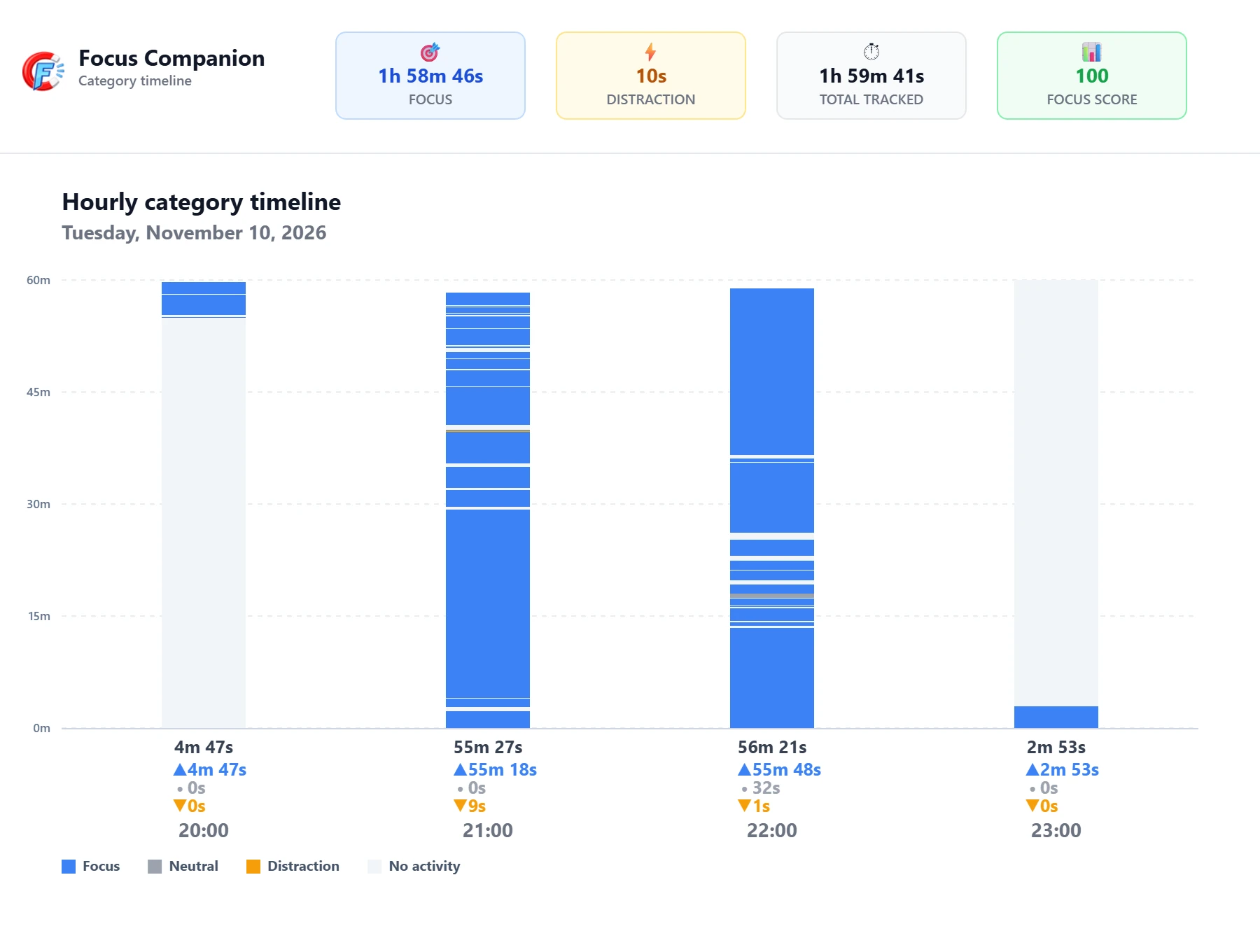
November 9 - domain transitions are worth reviewing for repetition, while remembering that a switch alone does not prove distraction.
Look at what happens before the repeated detour. Does it follow a difficult problem? An AI-generated response you're waiting for? A message notification? A task that hasn't been clearly defined?
Those are possible explanations to test, not conclusions a browsing log can establish by itself. The timeline shows browser behavior; only you can connect it to your intentions.
5. Turn one observation into a small experiment
You don't need a complicated productivity system to benefit from a timeline. A five-minute review can be enough:
1. Choose one period when you intended to work on a specific task.
2. Find one transition that surprised you in the category timeline.
3. Check the domain sequence to see what websites were involved.
4. Write a possible explanation, without treating it as a fact.
5. Try one small adjustment the next time that situation appears.
For example, if you repeatedly check your inbox while writing, try closing it for one writing block and checking it at a planned point. If your browsing changes because you genuinely need several research sources, there may be nothing to fix.
Review again after a few days. Did the adjustment make the task easier to complete? That result matters more than making a dashboard look a certain way.
What a browser timeline cannot tell you
It's worth being careful with interpretations. A timeline doesn't know your deadline, the quality of your work, whether you were thinking away from the screen, or why you opened a particular tab. It only describes the browser activity being tracked.
Likewise, Focus, Distraction, and Neutral are useful categories, not moral labels. A break isn't a failure. A work website isn't proof of deep concentration. A domain switch isn't necessarily a lost train of thought.
The value of the timeline comes from combining what it shows with what you remember about the task.
Awareness before restriction
I understand the appeal of blocking distracting websites. Sometimes a firm boundary helps. But blocking doesn't always explain the habit behind an interruption, especially when the website is also useful for legitimate work.
My preference is to begin with awareness: notice the transition, understand the context, and decide whether anything needs to change.
That's the thinking behind the domain and category timelines in Focus Companion. They're not meant to turn a day into a pass-or-fail score. They're meant to make patterns visible so you can make a more informed choice.
You don't need a perfectly smooth timeline to have a productive day. You need enough understanding to recognize when your attention is serving your goals-and when a small adjustment might help.
Start with one transition. Ask what happened before it. Then decide what, if anything, you want to change.
Put the idea into practice
Understand your browsing habits
Focus Companion is a privacy-first browser productivity coach that helps you notice distraction patterns and make calmer changes.
Stay connected
Join the Community
Share your experience with focus, multitasking, and calmer workdays.
